Plain-English guide · 10 min read
Instagram Shadowban: what it really is, how to detect it and how to avoid it
Did your reach collapse overnight? We calmly explain what's actually happening, how to check it, and what to do to bounce back.
Updated May 30, 2026
In this guide
What is a shadowban, really?
"Shadowban" is not an official Instagram term: the platform doesn't recognize the word. But it describes a very real phenomenon: the silent reduction of an account's reach. Your posts stay visible to your followers, but they no longer show up in hashtags, the Explore tab or suggestions — with no notification at all.
In practice, when people say shadowban, they're really describing algorithmic reach restrictions. Instagram limits certain accounts when it detects behavior it considers risky, or content that brushes against its rules. In the vast majority of cases these restrictions are temporary and reversible.
It's worth keeping calm: a shadowban is not a ban. Your account is neither deleted nor blocked. It's a muting of your distribution, not a permanent sanction. Most accounts recover their normal reach within a few days once the cause is fixed.
The nuance also matters because a drop in reach isn't always a shadowban. The algorithm evolves, your audience shifts, and some content simply performs worse than other. Before concluding it's a restriction, you need to rule out the natural explanations — which is exactly what the rest of this guide helps you do.
This guide complements our resource on Instagram automation.
The real symptoms of a shadowban
A shadowban is recognized by a set of signals that often appear together and suddenly. A single sign isn't enough to conclude: it's their combination that's telling.
Sharp drop in reach
Your views and reach collapse overnight, with no change in your posting rhythm or content quality. This is the clearest signal.
Disappearing from hashtags
Your posts no longer appear on hashtag pages, even for your followers, even on low-competition hashtags. This is the classic shadowban symptom.
Drop in Explore and suggestions
You're no longer recommended in the Explore tab or among suggested accounts. New profiles barely discover you anymore.
Engagement in free fall
Likes, comments and shares fall sharply, especially from people who don't follow you yet. Engagement from your loyal followers often stays stable.
If you recognize several of these symptoms at once, and they appeared abruptly, the shadowban hypothesis becomes serious. Move on to verification: there's a simple test to remove the doubt.
How to know if you're shadowbanned
No method is official, but a short procedure can clear up the doubt fairly reliably. The principle: check whether your content is visible to people who don't follow you.
- 1
Pick a niche hashtag
Post with a specific, lightly used hashtag (a few thousand posts at most). On a niche hashtag, you should normally appear without difficulty.
- 2
Have a third party test it
Ask someone who doesn't follow you (and has never interacted with you) to search that hashtag. If your recent post appears nowhere on the page, that's a sign of restriction.
- 3
Compare your statistics
In Instagram Insights, look at the share of reach coming from non-follower accounts. If it suddenly collapses when it used to be normal, that's consistent with a distribution restriction.
Check your account in seconds
To move faster, you can use our free checker. It analyzes the public signals tied to an account and gives you a first indication, with no app to install.
Test my accountCheck your status directly in Instagram
Before relying on a third-party test, know that Instagram now offers an official screen to tell you whether your account's reach is reduced. It's the most reliable source, because the information comes straight from the platform.
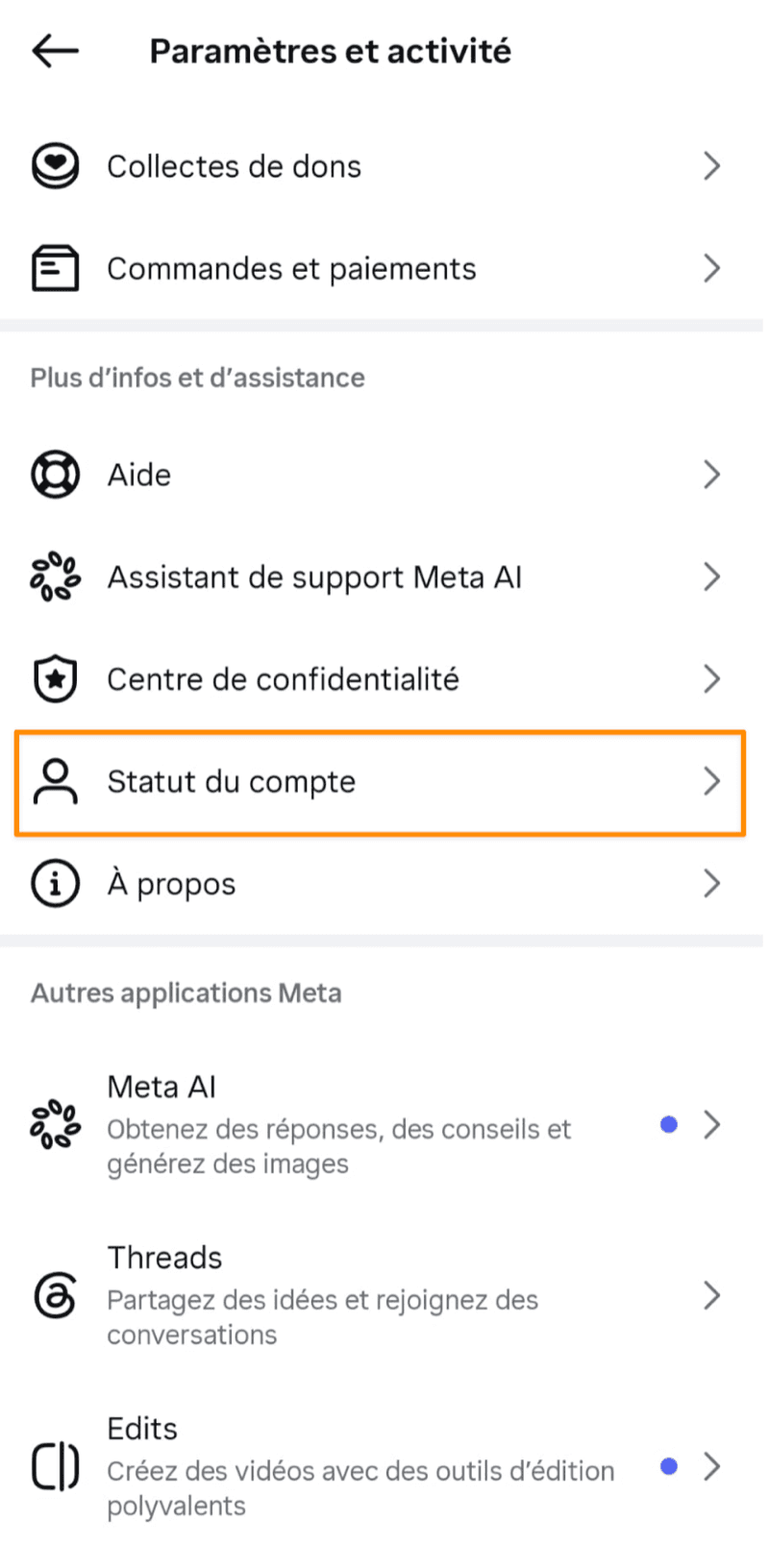
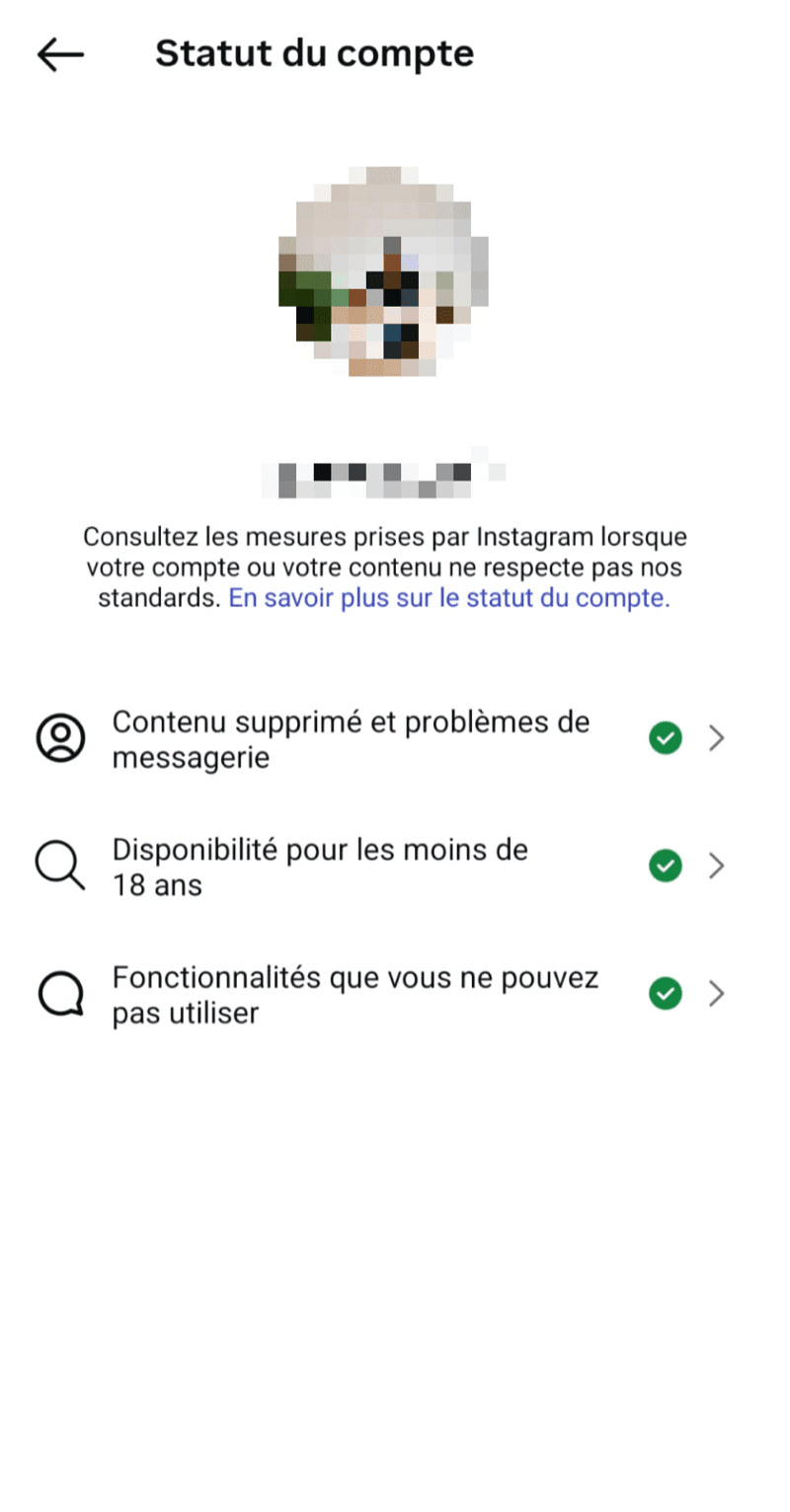
In the Instagram app, open your profile, tap the ☰ menu in the top right, then go to "Settings and activity". Scroll down to the "More info and support" section and open "Account Status".
The "Account Status" screen sums up three key things: whether content has been removed for breaking the rules, whether your account is eligible to be recommended (Explore, Reels, account suggestions), and most importantly the features you can't use. That last line is the most direct sign of a reach restriction, what people commonly call a "shadowban".
If everything is green with green checkmarks, Instagram reports no active restriction on your account. Conversely, if a line flags a problem or a limitation, you have official proof that your visibility is throttled, often with the reason and the steps to appeal it.
This is the method to prioritize: unlike third-party "shadowban tests", which remain indicative and rely on external estimates, Account Status is published by Instagram itself. Use it as your reference, then complement this diagnosis with our shadowban tester.
The 5 real causes of a shadowban
In practice, reach restrictions almost always stem from one of these five causes. The good news: they're all avoidable once you know them.
Behavior that looks like a bot
When your account chains identical actions mechanically — always the same interval, the same volume, around the clock — Instagram may read that pattern as automated and reduce your reach as a precaution.
Actions that are too fast or repetitive
Liking, following or commenting in bursts, far beyond what a human would do, triggers rate limits. Instagram tolerates active use but penalizes abnormal spikes.
Third-party tools connecting from a foreign browser
This is one of the most frequent and most underestimated causes. Many Chrome extensions and cloud bots drive your account from their own servers, with a technical footprint that doesn't look like your phone. Instagram spots these "from elsewhere" connections and restricts the account.
Banned or flagged hashtags
Some hashtags, even seemingly harmless ones, are restricted by Instagram because of misuse. Using them can mute your entire post.
Reports against your content
If several users report your posts or account, or if a piece of content brushes against community guidelines, Instagram may temporarily reduce your distribution while it assesses the situation.
You'll notice most of these causes revolve around one idea: anything that makes your account look "non-human" or "driven from the outside" raises the risk. That's precisely where the automation method you use makes all the difference.
What we see across 4,000+ accounts over 5 years
At Instafrenchie, we've been supporting the automation of Instagram actions (follow, targeted unfollow, like) for five years. Here, transparently, is what our field experience shows us about reach restrictions.

5 years
of observation
On Instagram action automation in real-world conditions.
4,000+
accounts managed
Profiles of every size and across all sectors.
0 bans
observed
No account bans attributable to our method over the period.
Our finding is simple: almost all the severe restrictions we see coming involve accounts that had used, before us, a Chrome extension or a cloud bot. Those tools drive the account from a remote server, which creates exactly the kind of technical footprint Instagram is looking to detect.
Conversely, our approach relies on a dedicated physical phone assigned to a single account (1:1). Actions come from a real device, with behavior spread over time the way a person would. In our experience, this difference in method is the single most decisive factor in avoiding reach restrictions.
We present these figures as field data, not as an absolute guarantee: Instagram doesn't publish its internal rules, and no method can promise zero risk. But the gap between "actions from a dedicated phone" and "actions from a foreign browser" is very clear in our data.
Our methodology
These observations are based on tracking the accounts supported by Instafrenchie since 2021. "0 bans observed" refers to the absence of any ban attributable to our method on the accounts we manage. This is not an academic study but an honest field report, which we share to help you understand the real risk factors.
To understand our method, read the page automation safety or discover how it works.
Action plan to recover from a shadowban
If you think you're affected, don't panic: in most cases, a few days of good practices are enough to restore normal reach. Here's the procedure, in order.
- 1
Pause the account for 24 to 72 hours
Stop all automated actions and ease off on likes, follows and comments. A pause lets the algorithm "cool down" and observe that behavior has returned to normal.
- 2
Remove all third-party apps
Disconnect and delete the Chrome extensions and cloud bots linked to your account. Revoke their access in Instagram's security settings. This is often the step that truly unblocks the situation.
- 3
Clean up your hashtags
Review the hashtags you use and remove any that are restricted or flagged. During recovery, favor clean hashtags relevant to your niche.
- 4
Ramp back up gently
After the pause, restart gradually: post normally, interact naturally, and increase your activity little by little rather than relaunching everything at once.
If reach doesn't return after one to two weeks of good practices, the cause probably wasn't fully removed — most often a third-party tool still connected somewhere.
How to avoid a shadowban long-term
Avoiding a shadowban is, above all, about behaving in a way that stays credible in the algorithm's eyes. Here are the good practices that make the difference over time.
- Keep a realistic action rhythm: no spikes, no mechanical activity around the clock.
- Vary your interactions and leave natural gaps between actions.
- Avoid restricted hashtags and favor hashtags relevant to your niche.
- Don't stack multiple automation tools on the same account.
- Be wary of "cheap" Chrome extensions and cloud bots that drive your account from their servers.
- Post original content that complies with community guidelines.
Why the automation method matters
Most automation-related shadowbans come from the "how," not the "what." Automating actions isn't the problem in itself: it's doing it from a foreign browser, at a mechanical pace, that draws the algorithm's attention.
That's the logic behind our approach at Instafrenchie: one dedicated physical phone per account, actions spread out like a human's, and guidance to calibrate the pace. The goal isn't to "trick" Instagram, but to stay within credible, measured usage. If you want to automate without chasing restrictions, that's where to start.
Frequently asked questions about the Instagram shadowban
What is an Instagram shadowban?
How do you know if you're shadowbanned?
How long does a shadowban last?
Why don't my posts appear in hashtags anymore?
Do bots cause shadowbans?
How do you avoid a shadowban?
How do you get out of a shadowban?
Does Instagram automation cause shadowbans?
Ready to make Instagram work for you?
No commitment. Active within 24h. Cancel in one click.